Fedex
1. Invalid packing instruction for dangerous goods commodity 2 within container 1 within package 1
Error | Invalid packing instruction for dangerous goods commodity 2 within container 1 within package 1 |
Note | Package 1 - First package item in courier payload |
Carrier | FedEx - DG |
Description | For every Fedex DG shipment, we have to send package instruction to the carrier. It will differ for each un code based on cargo, passenger and EQ. |
Payload Field | PackingInstructions |
Debugging |
|
Solution | If the package instruction in chemical reference API and the one in the payload differs, change it and try. |
2. Invalid proper shipping name for dangerous goods commodity 1 within container 1 within package 1
Error | Invalid proper shipping name for dangerous goods commodity 1 within container 1 within package 1 |
Note | Package 1 - First package item in courier payload |
Carrier | FedEx - DG |
Description | For every Fedex DG shipment, we have to send the proper shipping name to the carrier. 2. In the case of acids like Hydrochloric acid, naming is important. |
Payload Field | ProperShippingName |
Debugging |
|
Solution | If the proper shipping from the chemical reference API and the payload does not match, pls change it and give a try. |
3. Invalid dangerous goods commodity data
Error | Invalid proper shipping name for dangerous goods commodity 1 within container 1 within package 1 |
Note | Package 1 - First package item in courier payload |
Carrier | FedEx - DG |
Description | Valid point 1 and 2 |
Payload Field | ProperShippingName, PackingInstructions |
Debugging | Debugging points of point 1 and 2
|
Solution | Solution for point 1 and 2 |
4. Dangerous goods must be entered on all deliveries
Error | Dangerous goods must not be packed across deliveries |
Note | - |
Carrier | FedEx - DG |
Description | Basically the error means that all the cartons in the shipment must be haz / DG. |
Payload Field | - |
Debugging | Check the fedex XML requests. The version of the request must be v9 and not other versions. |
Solution | If the version is not v9, requires code changes,
|
5. Dangerous goods can not be different across deliveries.
Error | Dangerous goods can not be different across deliveries. |
Note | - |
Carrier | FedEx - DG |
Description | If the DG materials across the shipments varies, we get this error |
Payload Field | - |
Debugging | Check the fedex XML requests. The version of the request must be v9 and not other versions. |
Solution | If the version is not v9, requires code changes. FedEx needs to check. |
6. Account not found.
Error | Account not found.
|
Note | - |
Carrier | FedEx |
Description | The error occurs when the FedEx account number is invalid or not found in the FedEx database. |
Payload Field | AccountNumber / ShippingChargesPayment -> AccountNumber / DutiesPayment -> AccountNumber |
Debugging | If the shipper's account number causes an issue, check the depot configuration else check the job API. |
Solution | If the issue is not with the shipper's account number, the client needs to change the account number in the payload / Job API. If the issue is with the shipper’s account number, pls change it in depot configuration. |
7. Special Service "DANGEROUS_GOODS" invalid
Error | Special Service "DANGEROUS_GOODS" invalid
|
Note | '1.4', '2.1', '2.2', '3', '4', '5', '8' - ADG |
Carrier | FedEx |
Description | '1.4', '2.1', '2.2', '3', '4', '5', '8' - ADG Accessible DG ( ADG ) supported service types are
o FedEx Priority Overnight® o FedEx 1Day® Freight o International Priority o International Priority Freight o FedEx International Priority® o FedEx International Priority® Express
|
Payload Field | SpecialServicesRequested -> DangerousGoodsDetail -> Containers -> HazardousCommodities -> Description -> HazardClass |
Debugging | Check the service type and class number combination. |
Solution | Need to use the supported service type. |
8. Missing or invalid ship from State Province Code
Error | Missing or invalid ship from State Province Code
|
Note | - |
Carrier | FedEx |
Description | The error states that the shipper address that we sent to the carrier does not have a state.
|
Payload Field | - |
Debugging | In the Job API check the return_to address has state. If it does not have, it is the issue.
Else, check the depot address. It should have a state in it. |
Solution | Ask the client to add state to the return_to address. |
9. validation failure for CreateOpenShipmentRequest Error:cvc-datatype-valid.1.2.1: '' is not a valid value for 'decimal'. cvc-type.3.1.3: The value '' of element 'Amount' is not valid. cvc-datatype-valid.1.2.1: '' is not a valid value for 'decimal'. cvc-type.3.1.3: The value '' of element 'Amount' is not valid.
Error | validation failure for CreateOpenShipmentRequest Error:cvc-datatype-valid.1.2.1: '' is not a valid value for 'decimal'. cvc-type.3.1.3: The value '' of element 'Amount' is not valid. cvc-datatype-valid.1.2.1: '' is not a valid value for 'decimal'. cvc-type.3.1.3: The value '' of element 'Amount' is not valid.
|
Note | - |
Carrier | FedEx |
Description | If any of the data that we sent to FedEx has some data validation issue, we get this error.
|
Payload Field | - |
Debugging | Fetch the payload from logs and verify which fields are empty. |
Solution | Generally the error comes when unit_price, customs_value, weight is empty. |
10. Errors ending with must be a string / must be a number
Error | Errors ending with must be a string / must be a number
|
Note | - |
Carrier | Common for all carrier |
Description | Error occurs when courier payload from manage has some invalid data.
|
Payload Field | - |
Debugging | - |
Solution | Will need a code change |
11. Electronic trade documents are not available for domestic shipments
Error | Electronic trade documents are not available for domestic shipments
|
Note | - |
Carrier | FedEx |
Description | The Issue states that the Electronic trade documents can not be used for domestic shipments.
|
Payload Field | - |
Debugging | Check the shipper and ship to address. Both country codes must not match. |
Solution | Client needs to change either the shipper or ship to address. |
12. International duties payor account number is invalid or Recipient/Third party account Validation Failed
Error | International duties payor account number is invalid or
|
Note | - |
Carrier | FedEx |
Description | It means that the duties payment account number provided by the user is invalid.
|
Payload Field | - |
Debugging | Either the account number entered by the client is invalid / the owner of the account number might have disabled third party billing. |
Solution |
|
13. Origin- postal-state mismatch shipper postal- state mismatch
Error | Origin- postal-state mismatch shipper postal- state mismatch
|
Note | - |
Carrier | FedEx |
Description | FedEx validates state versus pincode combination. So if the pincode does not belong to the state, we get this error. |
Payload Field | - |
Debugging | Check the pincode / zipcode for the given state. |
Solution | Need to enter the correct pin code for the state. |
14. Invalid booking confirmation number
Error | Invalid booking confirmation number
|
Note | - |
Carrier | FedEx |
Description | For all the international freight shipments, FedEx requires a booking confirmation number to be passed in the request payload. |
Payload Field | - |
Debugging | Check if the client has entered a booking confirmation number in the UI. |
Solution | If the booking confirmation number is not entered in the UI, the client has to. Else, the team needs to check the code. |
15. GRITH of carton 1 error - For freight shipments, the dimensions should be greater than some value.
Error | GIRTH of carton 1 error - For freight shipments, the dimensions should be greater than some value.
|
Note | - |
Carrier | FedEx |
Description | What is girth ? For example, if you had a box that measures 20cm x 10cm x 10cm. The calculation would be: 10 + 10 = 20 x 2. The girth would be 40cm.
|
Payload Field | - |
Debugging | Check the service type of the shipment. If it is freight, then check if all the dimensions exceed 30 CM. The girth calculation must have values above 30. |
Solution | Change the carton. |
16. General failure / try again later
Error | General failure / try again later
|
Note | - |
Carrier | FedEx |
Description | Error comes when the FedEx web service is down or the traffic is high. |
Payload Field | - |
Debugging | Try to hit FedEx web service directly from Postman, If it persistently returns the same error, report to the FedEx team. |
Solution | Either wait for a day or report the issue to the FedEx team. |
17. Authentication failed
Error | Authentication failed
|
Note | - |
Carrier | FedEx |
Description | Error occurs whenever the fedex credentials are not mapped to the shipper's account number. |
Payload Field | - |
Debugging | Try to reach FedEx / Hach |
Solution | Try to reach FedEx / Hach |
18. Service is not allowed / The service is not allowed for the origin. / Customs value is required
Error | Service is not allowed / The service is not allowed for the origin.
|
Note | - |
Carrier | FedEx |
Description | Error occurs when the server type can not serve the origin and destination. |
Payload Field | - |
Debugging | Check the service type and address. |
Solution | Try changing the service type / address |
19. Package 1 - YOUR_PACKAGING cannot exceed the limit of 150.00 LB.
Error | Package 1 - YOUR_PACKAGING cannot exceed the limit of 150.00 LB.
|
Note | - |
Carrier | FedEx |
Description | Weight of cartons can not exceed 150 LB. |
Payload Field | - |
Debugging | Check if the weight of any carton exceeds 150 LBS. If so, it needs to be changed. |
Solution | Try to reduce the weight of the carton that has weight more than 150 LB. |
20. Unable to retrieve record from database
Error | Unable to retrieve record from database
|
Note | - |
Carrier | FedEx - above 40 cartons |
Description | Error comes for FedEx above 40 cartons request. Whenever the record of the create open shipment call is not found in the FedEx database, FedEx returns the error. |
Payload Field | - |
Debugging | - |
Solution |
|
21. RequestedShipment TotalWeight - weight must be greater than 0.
Error | RequestedShipment TotalWeight - weight must be greater than 0.
|
Note | - |
Carrier | FedEx |
Description | For all shipments, total weight is a mandatory field and it should be greater than 0. |
Payload Field | TotalWeight |
Debugging | Check the gross weight of the cartons. If the sum of weight of all cartons ends up with the value 0, then it should be changed. |
Solution |
|
22. Broker Select Option is not allowed.
Error | Broker Select Option is not allowed.
|
Note | - |
Carrier | FedEx |
Description | Broker information can be sent only for international shipments. |
Payload Field | Brokers |
Debugging | Check if the shipment is a domestic shipment. If it is domestic, client can not use broker information |
Solution |
|
23. SATURDAY_DELIVERY is not allowed for the origin/destination pair.
Error | SATURDAY_DELIVERY is not allowed for the origin/destination pair.
|
Note | - |
Carrier | FedEx |
Description | Saturday delivery can not be used for international shipments. |
Payload Field | - |
Debugging | Check the shipper and ship to address. If the shipment is international shipment and client is trying to do it use saturday delivery, it is the issue |
Solution | Make the shipment as domestic inorder to use Saturday delivery.
|
24. Accessible Dangerous Goods is not allowed with the service selected. OR Inaccessible Dangerous Goods is not allowed.
Error | Accessible Dangerous Goods is not allowed with the service selected. OR Inaccessible Dangerous Goods is not allowed.
|
Note | '1.4', '2.1', '2.2', '3', '4', '5', '8' - ADG |
Carrier | FedEx |
Description | If any material in the Job api has class '1.4', '2.1', '2.2', '3', '4', '5', '8', allowed service type is o FedEx 1Day® Freight o International Priority o International Priority Freight o FedEx International Priority® o FedEx International Priority® Express |
Payload Field | - |
Debugging | Check the class number and service type combination. Service type should be a supported type. |
Solution | Need change the service type if there is an mis
|
25. Package weight exceeds maximum for requested service/packaging.
Error | Package weight exceeds maximum for requested service/packaging.
|
Note | - |
Carrier | FedEx |
Description | For express and ground shipments, allowed weight is 150 LBS. |
Payload Field | - |
Debugging | Check if the weight of any carton exceeds 150 LBS. |
Solution | Weight of the carton should be reduced below 150 LBS
|
26. Length, Width, and Height must be greater than 0 for shipment total dimensions.
Error | Length, Width, and Height must be greater than 0 for shipment total dimensions.
|
Note | - |
Carrier | FedEx |
Description | Dimension ( length, width, height ) of cartons should be greater than 0. |
Payload Field | - |
Debugging | Check the height, width, length of all cartons. It should be greater than 0. |
Solution | If the dimensions are zero in the job API, the client has to make changes in carton master / need to change the carton.
|
27. Origin/shipper country code is invalid.
Error | Origin/shipper country code is invalid.
|
Note | - |
Carrier | FedEx |
Description | Country code is a mandatory field for all addresses and it should be in the below format. US, DE, CA… Refer FedEx developer guide for more country code information. |
Payload Field | - |
Debugging | Check the country code of shipper, ship to, return to address. |
Solution | Valid country code must be entered.
|
28. Ground Shipping is not authorized for this User
Error | Ground Shipping is not authorized for this User
|
Note | - |
Carrier | FedEx |
Description | - |
Payload Field | - |
Debugging | - |
Solution | Should raise the issue to the FedEx team. |
29. The recipient / Third party account number is invalid
Error | Recipient / Third party account number is invalid
|
Note | - |
Carrier | FedEx |
Description | - |
Payload Field | - |
Debugging | - |
Solution | Need to try it after 6 hrs. Even after it is not working, then the account number might be invalid or the Collect user has disabled third party billing.
|
Fedex Betterstack debugging keywords
1. fedex-booking-error
2. fedex-OpenShipment-error
3. fedex-OpenShipment-success
UPS
1. The UPS account number provided as the payment method cannot be billed, please try another account.
Error | The UPS account number provided as the payment method cannot be billed, please try another account.
|
Note | - |
Carrier | UPS |
Description | Collect / third party account number is invalid. |
Payload Field | - |
Debugging | - |
Solution | Change the account number or contact UPS team
|
2. Missing/invalid packaging type
Error | Missing / invalid packaging type
|
Note | - |
Carrier | UPS |
Description | Carton code provided by pando is invalid. |
Payload Field | PackagingType |
Debugging | Payload name: AcceptanceAuditPreCheckRequest |
Solution |
|
3. Your UPS Account number is not authorized for Dangerous Goods shipments with CAO Transportation Mode.
Error | Your UPS Account number is not authorized for Dangerous Goods shipments with CAO Transportation Mode.
|
Note | HACH’s account number will not support CAO.
|
Carrier | UPS |
Description | The provided account number is not authorized to ship materials in a cargo aircraft. |
Payload Field | - |
Debugging | Login to UPS account/contact UPS and check if the UPS has enabled CAO for the account number. |
Solution | Inform the client that the client account number will not support CAO. So they have to change their transportation mode.
|
4. InvoiceLineTotal MonetaryValue must be greater than 0
Error | InvoiceLineTotal MonetaryValue must be greater than 0
|
Note | - |
Carrier | UPS |
Description | The invoice line total should be a positive integer and must be greater than 0. |
Payload Field | InvoiceLineTotal -> MonetaryValue |
Debugging | Check if the sum of unit_price * quantity is greater than 0. |
Solution | Clients should change unit_price. Unit_price must be greater than 0.
|
5. Missing or Invalid ClassDivisionNumber.
Error | Missing or Invalid class division number.
|
Note | - |
Carrier | UPS |
Description | Class number should be valid for the UN number. |
Payload Field | ClassDivisionNumber |
Debugging | Check the class number in the UPS chemical reference API. |
Solution | Class number should be a valid one.
|
6. Missing or invalid attention name / Missing or invalid ship to company name or address error message / Missing or invalid ship to address line 1.
Error | Missing or invalid attention name / Missing or invalid ship to company name or address error message / Missing or invalid ship to address line 1.
|
Note | - |
Carrier | UPS |
Description | Max allowed character is from 30 to 35. |
Payload Field | - |
Debugging | Check if the length of the value is greater than 35. |
Solution | If the length is greater than 35, the client has to change it.
|
Issue: Error while creating shipment
Error: “ERROR IN REFERENCE VALUE” / “Invalid Package Reference Value” - PO number
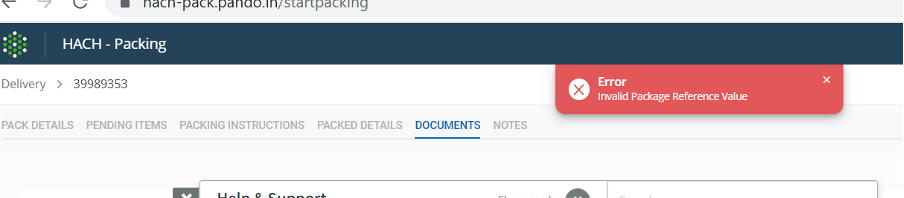
Right-click· Check the PO number in job api, by right-clicking on the screen, select INSPECT Network double click on the job ID—search for po_number.
· For FedEx, length of customer PO number can be 40.
whereas for UPS, length of customer PO number should be less than 35.
· Reducing the length of the customer PO number will allow you to create the shipment. Ask the user for the updated po_number and inform engineering team (Sumanth/ran/sam) to update it from the backend.
Error: “Invalid Recipient Country Code RequestedShipment Recipient- An Address is required for a Party”
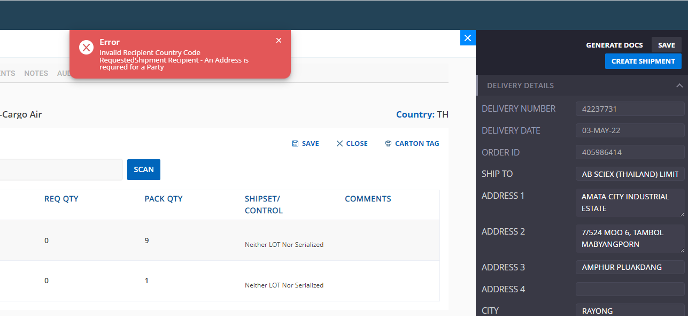
· Go into the delivery by clicking on edit packing
· Click on finalize shipment
· Check if the freight forwarder is enabled.
· If it is enabled and the address is not filled, then this error is displayed.
Manifestation
- In betterstack, pls check the tag production-packing-manage and search “[pancake_service]” to check the request and response with start date
- Fetch the details related to XML in the database and extract the information
- DB query pattern 'request.request_body':/EndOfDay/
Was this article helpful?
That’s Great!
Thank you for your feedback
Sorry! We couldn't be helpful
Thank you for your feedback
Feedback sent
We appreciate your effort and will try to fix the article